TopDeck.gg
- 4.6
- Rating
- 10.00K
- Installs
- Free
- Price

 Analysis by App-foxy
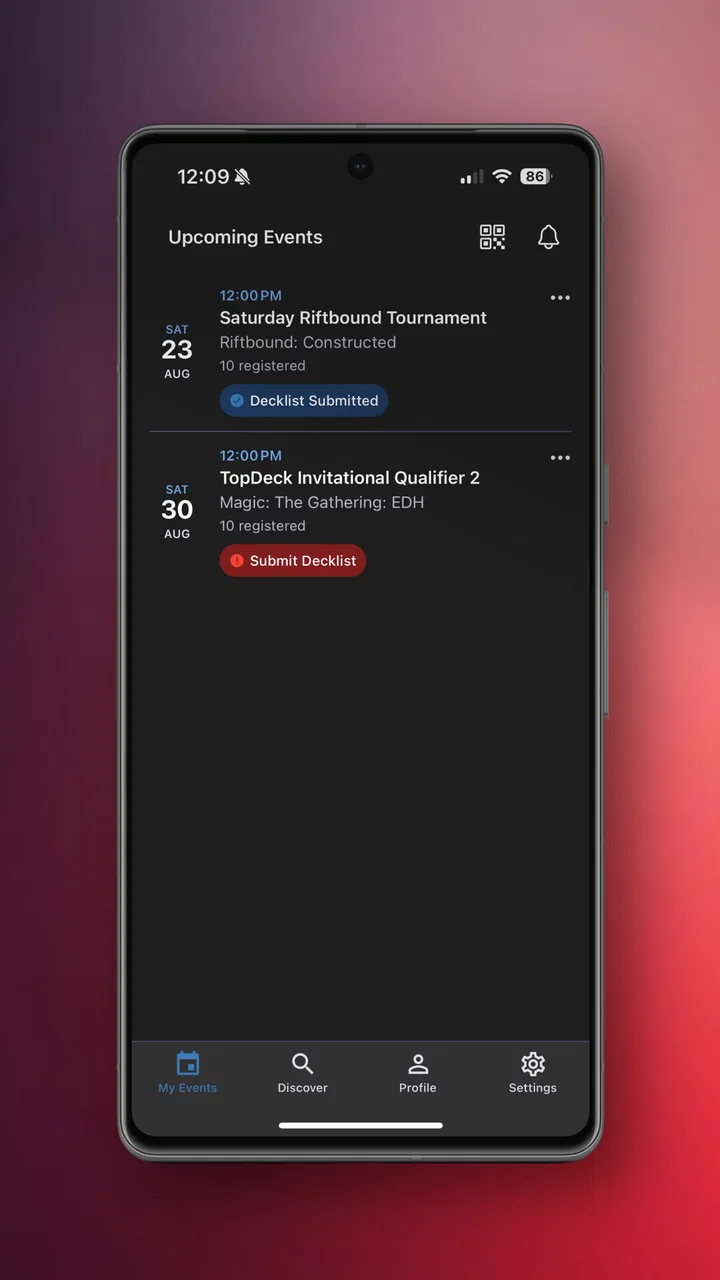
I approached TopDeck.gg as a first-time user looking for a practical way to keep up with tournaments rather than as someone already deeply involved in competitive events. That distinction matters. This is an events app from TopDeck.gg, and its main appeal is the chance to bring tournament activity into one place instead of relying on scattered social posts, chat messages, spreadsheets, or separate event pages.
The app is free, carries an Everyone age rating, and is available for devices running Android 7.0 or later. It reached the store on August 5, 2024, and the current version is 2.0.4. Those details make it relatively approachable for people using an older Android phone, while the free price removes the biggest barrier to trying it. I also noticed that its public reception is encouraging: a 4.7 average from around fifteen ratings and eight written reviews is a positive early signal, although the small review pool means I would treat it as promising rather than definitive.
What TopDeck.gg feels like when you begin
The first thing I would tell a new user is not to expect a general social network or a complete replacement for every tournament tool. The app makes more sense as a focused tournament hub. Its value depends on whether the events you care about are represented and whether you prefer having tournament information organized around an event rather than hunting through several unrelated channels.
You May Also Like

 AccuWeather: Weather Radar
AccuWeather Review: A Quick, Clear Forecast for Everyday Decisions
For everyday plans, the best forecast is the one you can understand quickly. AccuWeather makes rain timing, radar, and local conditions easy to act on, with a few trade-offs.

 Hill Climb Racing
Why Hill Climb Racing Still Turns Crashes Into One More Run
A tiny car, a bumpy hill and one more upgrade: Hill Climb Racing keeps resurfacing because its simple chaos makes every near-miss feel personal.

 AliExpress - Shopping App
AliExpress Makes Global Shopping Feel Personal, but Shoppers Bear the Risk
AliExpress turns a global marketplace into a pocket-sized discovery engine. Its reach is useful, its shopping loop compelling, and its trade-offs easy to miss.

 Lords Mobile: Kingdom Wars
Lords Mobile Is a Kingdom-Building Routine, Not a Quick Match
A case-by-case verdict on the building, battles, device demands, and social commitments that make Lords Mobile rewarding for some players and exhausting for others.

 PDF Scanner app - TapScanner
TapScanner Makes Paperwork Easier to Capture, Check, and Share
TapScanner makes scanning with a phone feel less like a rescue operation and more like a dependable step in getting work done. Its capture tools are useful, though not flawless.

 Block Blast!
 Shows How Much a Puzzle Game Can Leave Out
A quiet grid game shows why puzzle players increasingly value instant clarity, repeatable skill and low-pressure play—and where the genre still needs to catch up.
More From Our News Desk
View All News


That focus is useful for several kinds of users. A player can use it to stay oriented before and during an event. Someone attending a local competition can use it as a central reference point instead of repeatedly asking where to find the latest details. A spectator may appreciate having a clearer route into tournament activity without needing to understand every community channel first. Organizers and regular competitors are likely to get more from it than people who only enter an event once or twice a year.
My main expectation-setting advice is simple: install it with one specific purpose in mind. Decide whether you want to discover an event, follow one you already know about, or use it as a regular tournament companion. That small decision keeps the first session from feeling aimless. Apps in the events category can become confusing when they present too many possible directions, but a concrete goal gives you an immediate test of whether this one fits your routine.
The app’s store summary calls it “The Ultimate Tournament Hub,” but I found it more helpful to judge that promise by workflow rather than by the wording. A hub is only useful if it reduces the number of places you need to check. If your tournament life is already managed smoothly through a community server, a dedicated organizer page, and a calendar, TopDeck.gg may feel like an additional stop. If those sources are fragmented, the central approach becomes much more attractive.
Getting through the first setup
After installing, I would begin by looking for the event or tournament that matters most to me rather than browsing randomly. This is the fastest way to understand the app’s structure. If I were preparing for a weekend competition, I would search or browse until I found that event, then inspect the available information before spending time exploring less relevant areas.
A good first-session habit is to keep the event name, organizer name, or game context nearby. Tournament titles are not always unique, and remembering only a vague phrase can make discovery slower. Using the most precise wording you have gives you a better chance of reaching the right event quickly. This is a small tip, but it is more useful than simply opening the app and hoping the most relevant competition appears immediately.
I would also avoid treating the initial screen as a complete explanation of the product. Tournament apps often make more sense after you open a specific event. The meaningful details are usually connected to context: which competition you are viewing, what stage it is in, and what information is relevant to your role. Moving from the broad event view into the particular tournament you care about helps reveal whether the app is genuinely useful for you.
One trade-off is that a focused tournament hub can feel less familiar than a standard calendar or messaging app. A calendar is excellent for dates and reminders, while a chat is better for conversation and quick questions. TopDeck.gg occupies a different position. I would use a calendar to remember that an event is coming, a community channel to talk with other people, and this app to stay close to the tournament itself. Expecting it to behave exactly like either alternative could lead to disappointment.
For a first-time user, the most reassuring path is therefore narrow: install the app, identify one relevant tournament, open it, and decide whether the information is easier to follow there than through your usual sources. You do not need to understand every possible use before making that judgment. The first successful session should be measured by clarity, not by how many screens you visit.
The first meaningful success
In my view, the first real success is not merely launching the app. It is reaching a tournament page or event view that answers a question you actually had. That question might be where to find a competition, how to return to it later, or how to keep its information separate from unrelated events. Once the app helps with one concrete need, you can decide whether it deserves a regular place on your phone.
For a player, I would test it before the event begins, when there is enough time to notice any confusing labels or missing context. Waiting until the middle of a competition is a poor way to evaluate any event app because pressure makes small navigation problems feel much worse. A calm pre-event check lets you learn where the relevant information lives and whether the app complements your existing preparation.
For a spectator, the first useful action may be finding a tournament and returning to it without relying on a message thread. That is an important distinction from simply browsing a list. The app becomes worthwhile when it turns a one-time discovery into something you can revisit. If you are following several events, test them one at a time and notice whether the experience remains understandable as your list grows.
For an organizer or community leader, I would use the app as a consistency check. Try approaching the event as a newcomer who does not already know the internal terminology. Can you identify what the event is and why it matters without asking someone for help? That perspective can reveal friction that experienced participants overlook. Even when the app is not the only communication channel, it can serve as a cleaner public-facing reference than a long conversation thread.
The best early test is whether TopDeck.gg saves you a search, a question, or a repeated trip through several channels. If it does, the app has already demonstrated practical value. If it only duplicates information you can reach faster elsewhere, its role may remain optional.
Where confusion can appear
The most likely source of confusion is not the free installation or the age rating; it is understanding what belongs inside the tournament hub and what still belongs in your other tools. A user may open the app expecting a complete communication system, a universal event calendar, or a replacement for every organizer workflow. I would avoid those assumptions and treat it as a tournament-centered layer in a larger routine.
Another possible friction point is event relevance. A hub can feel excellent when it contains the competitions you care about and less useful when your preferred community uses other places. This is not necessarily a flaw in the interface. It is a question of coverage and habit. Before committing to it, I would check whether the events you actually follow are available and presented in a way that makes sense to you.
There is also a difference between discovering an event and managing a busy schedule. If your main problem is remembering times across many unrelated activities, a calendar may remain the better tool. If your problem is finding tournament-specific context, TopDeck.gg is the more natural candidate. I would not force one app to solve both problems when each tool has a clearer strength.
New users should pay attention to the difference between information that is stable and information that may change during an event. Stable details can be reviewed early, while changing details deserve a check closer to the time you need them. I would make the app part of a quick pre-event routine rather than assume that one visit means I never need to look again. That approach is especially sensible for competitions where timing and participation details matter.
On the technical side, the minimum Android requirement of 7.0 is broad enough to include many older devices, which is helpful if you are not using a recent phone. Still, compatibility is only the first question. The more important one is whether the app remains comfortable on your particular device and connection. I would install it before an important event, not minutes before it begins, so there is time to learn the layout and resolve any personal setup issues.
The public rating deserves a similarly measured reading. A 4.7 average is encouraging, and the app has passed the ten-thousand-install mark, showing that it is not limited to a private test group. At the same time, the rating comes from a modest number of people, so I would use it as a reason to try the app, not as proof that every tournament workflow will suit every user.
How I would use it in an ordinary weekend
Imagine I am planning to watch or enter a tournament on Saturday. On Friday, I would open TopDeck.gg and locate the event instead of waiting for a last-minute message. I would read through the event view with one question in mind: does this give me a clearer starting point than my current method? If yes, I would return to the same place on Saturday rather than reconstructing the search from scratch.
Before leaving home, I would use the app as a reference and keep my normal communication method available for questions or conversation. This two-tool approach is more realistic than expecting the app to replace every part of the day. The hub handles tournament orientation; messaging handles people; the phone calendar handles broader time management. Each tool has a defined job, and that prevents unnecessary duplication.
If I were attending in person, I would check the event before arriving and again when I needed tournament-specific context. If I were watching remotely, I would use the same routine but judge the app by how quickly it gets me back to the event I care about. In both cases, the useful habit is returning to a known event rather than repeatedly browsing the whole catalog.
A less obvious use is onboarding someone else. If a friend asks what an event is or where to begin, pointing them toward a dedicated tournament hub may be easier than forwarding a long chain of messages. I would still give them the event name and explain what they should look for. The app can provide structure, but a short human explanation often removes the last bit of uncertainty.
Who should install it, and who should skip it
I would recommend trying TopDeck.gg if you regularly participate in tournaments, follow competitive events, or find yourself switching between several sources to keep track of them. It is particularly suitable for someone who wants a dedicated place to begin, rather than treating event information as an accidental by-product of social media or chat.
I would be more cautious if your needs are limited to reminders, casual event discovery, or conversation. A calendar may be simpler for reminders, and a community platform may be more useful for discussion. Likewise, if the tournaments you care about are not represented in the app, the hub concept cannot compensate for that gap. The right decision depends less on the app’s general promise and more on whether it fits the events already present in your life.
People who dislike maintaining several apps should also test it honestly. If TopDeck.gg merely repeats information you already access quickly, adding it may create another notification or browsing habit without enough benefit. On the other hand, if your current system involves searching old messages and asking the same questions repeatedly, the dedicated structure could repay the small effort of learning it.
The app is also a reasonable low-risk trial because it is free. You can judge its usefulness through your own tournament rather than making a financial commitment first. I would still avoid installing it just because the rating looks good. Install it when you can name a real event or recurring need that will let you evaluate it fairly.
My next-step routine after the first event
Once I had used the app successfully for one tournament, I would decide whether it belongs in my regular preparation routine. I would not immediately assume that every event needs the same treatment. Some competitions may be easy to follow through existing channels, while others benefit from a central tournament view. Selective use is a strength here: the app does not need to replace everything to be worthwhile.
I would also keep a short personal checklist for future events: find the correct tournament, open its details early, return to it before the event, and use other tools for conversation or general scheduling. This workflow turns the app from something I occasionally remember into a repeatable part of preparation. It also exposes weaknesses quickly. If returning to an event is awkward or the information does not answer practical questions, I would know before relying on it.
Keeping the app updated is sensible, especially because the current version is 2.0.4 and the product is still relatively young. I would not assume that a newer version automatically changes my workflow, but I would pay attention to improvements when they appear. Early apps can develop quickly, and a focused user can notice whether updates make tournament navigation smoother or simply add complexity.
My final recommendation is to treat TopDeck.gg as a specialist companion, not an all-purpose replacement for calendars, chats, or organizer communication. TopDeck.gg has a clear reason to exist: it gives tournament activity a dedicated home. In my experience, that is most valuable when event information is otherwise scattered and least valuable when your existing system is already perfectly organized.
For a first-time user, the path is reassuringly simple: install the free app, choose one tournament that matters to you, and see whether it answers a real question faster than your current method. The positive early rating and growing install base make it worth testing, while its focused purpose makes the decision easy to evaluate. If it helps you reach and revisit the right event with less friction, keep it in your routine. If your needs are mainly calendars or conversation, use the more specialized alternative instead.
FAQs for TopDeck.gg
01What is TopDeck.gg and how does it work?
TopDeck.gg is a platform designed for card game enthusiasts, offering a comprehensive database of decks for various games. Users can search for decks by game, type, or popularity. The app provides detailed statistics, user ratings, and strategies to help players improve their gameplay. It's a must-have for those looking to enhance their card game experience.
02Is TopDeck.gg free to use or are there any in-app purchases?
Yes, TopDeck.gg is free to download and use. However, it offers in-app purchases for premium features such as advanced statistics, ad-free browsing, and exclusive deck access. These features enhance the user experience but are not necessary for the basic functionality of the app.
03Can I share my own decks on TopDeck.gg?
Absolutely! TopDeck.gg encourages users to share their custom decks. You can upload your decks, complete with descriptions and strategies, to help others in the community. This feature not only aids others but also allows you to receive feedback and improve your deck-building skills.
04How frequently is the deck database updated?
The deck database on TopDeck.gg is regularly updated to ensure the latest strategies and decks are available. Updates typically occur daily, accommodating new trends and user submissions. This ensures players have access to the most current and effective decks for competitive play.
05Does TopDeck.gg support multiple card games?
Yes, TopDeck.gg supports a wide variety of popular card games. Whether you're a fan of Magic: The Gathering, Pokémon, Yu-Gi-Oh!, or Hearthstone, you will find curated decks and strategies. The app is continuously expanding its database to include more games, catering to a diverse gaming audience.
Pros
- Intuitive interface for easy navigation.
- Comprehensive card database available.
- Regular updates with new features.
- Supports multiple card games.
- User-friendly deck-building tools.
Cons
- Limited offline functionality.
- Occasional sync issues reported.
- Ads can be intrusive at times.
- Some features locked behind paywall.
- Requires stable internet connection.

TopDeck.gg
Gallery